
AI Subtitle Translator
for SRT and VTT files
Translate subtitle files into 100+ languages without touching the timing. Batch translation, a built-in editor and SRT or VTT export — in a native macOS app.
Supported formats: SRT or VTT
Features
Everything you need
Built for filmmakers, content creators, translators, and anyone working with subtitles.
AI-Powered Translation
100+ languages with auto-detection, batch translation, and real-time progress tracking.
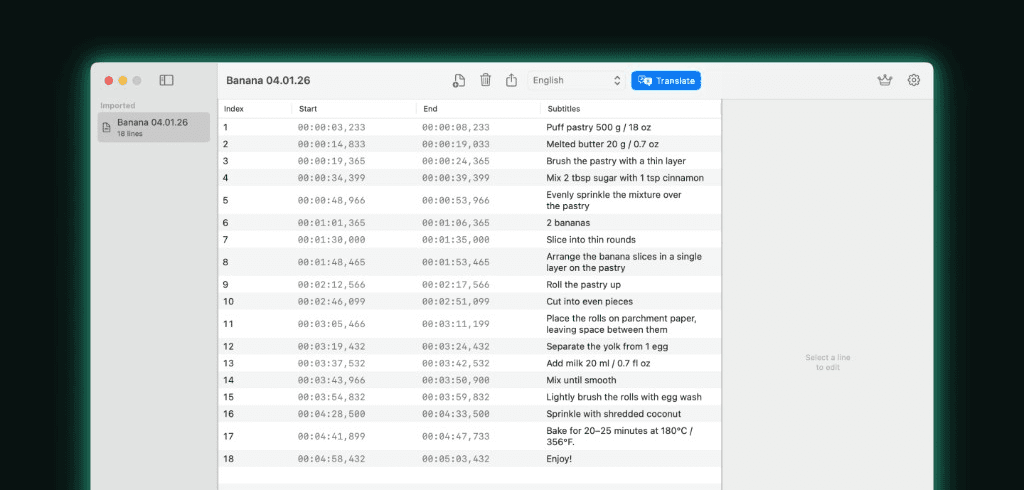
Built-in Subtitle Editor
Edit text, fine-tune timing (±0.1s), and switch between original, translated, or side-by-side views.
Validation & QC
Catch overlapping entries, long durations, reading speed issues, and missing translations before export.
Flexible Export
Export SRT or VTT — original, translation only, or bilingual. Batch export with smart naming.
100+ Languages
European, Asian, Middle Eastern, and African languages — covering the world's major scripts.
Native macOS App
Built with SwiftUI for Apple Silicon and Intel. Dark mode, keyboard shortcuts, drag & drop.
How it works
From file to translation in seconds
Import
Drag and drop subtitle files. Auto-detected encoding and format.
Translate
Pick one or many target languages. AI does the rest.
Edit & Review
Fine-tune timing, fix overlaps, compare side-by-side.
Export
Choose SRT or VTT. Original, translation, or bilingual.
Languages
100+ languages supported
Translate to and from the world's most spoken languages.
European
English, Spanish, French, German, Italian, Portuguese, Russian, Polish, Dutch, Swedish, Norwegian, Danish, Finnish, Greek, Czech, Romanian, Hungarian, Bulgarian, Croatian, Slovak, Ukrainian…
Asian
Chinese (Simplified & Traditional), Japanese, Korean, Hindi, Thai, Vietnamese, Indonesian, Malay, Bengali, Tamil, Telugu, Urdu…
Middle Eastern & African
Arabic, Hebrew, Persian, Turkish, Swahili, Yoruba, Zulu, Amharic…
Pricing
Simple pricing
Start free. Upgrade when you need more.
Free
Try the full experience
- ✓10 free translations
- ✓Full editor & validation tools
- ✓SRT and VTT formats
- ✓All export modes
Pro
Weekly · Monthly · Yearly
- ✓Unlimited translations
- ✓Unlimited batch processing
- ✓Priority support
- ✓All future features included
FAQ
Common questions
How do I translate an SRT file?+
Drag the .srt file into Subtitle Translator, pick one or more target languages, and press Translate. The app translates every line with AI and writes a new subtitle file, so the original stays untouched.
Does translating subtitles change the timing?+
No. Only the text of each subtitle entry is translated. Start and end timecodes, entry numbering and line breaks are carried over unchanged, so the translated file stays in sync with the video.
Which subtitle formats are supported?+
Subtitle Translator reads and writes SRT and VTT. You can open an SRT file and export it as VTT, or the other way round, with or without translating it.
Can I translate several subtitle files at once?+
Yes. Batch translation takes multiple files and multiple target languages in one run — for example one English SRT into Spanish, German and Japanese — and exports every combination with predictable file names.
Is the subtitle translator free?+
The first 10 translations are free and include the full editor, validation and every export mode. Unlimited translation requires a Pro subscription, billed weekly, monthly or yearly.
How many languages can it translate into?+
Over 100, covering European, Asian, Middle Eastern and African languages. The source language is detected automatically, so you only choose where you are translating to.
Does it work offline?+
Editing, timing adjustment, validation and format conversion work offline. Translation itself needs an internet connection because it runs through an AI translation service.
Ready to translate?
Download Subtitle Translator on the Mac App Store and translate your first subtitle file in seconds.
Download on the Mac App StoremacOS · Apple Silicon and Intel